
Most Windows-compatible keyboards include a Windows logo key that can be used to open the Start menu, or can be used in combination with other keys to start certain Windows functions.
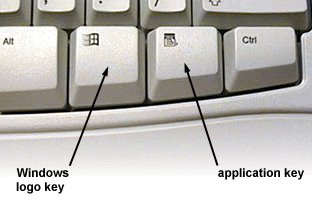
The Windows Logo key is generally located left-hand between the “Ctrl” and “Alt” keys and duplicated right-hand of spacebar and right “Alt”. Here’s a complete list of Windows XP keyboard shortcuts with the logo key.
Windows Logo: Display or hide the Start menu
Windows Logo+TAB: Cycle through taskbar buttons
Windows Logo+Break: System Properties dialog box
Windows Logo+R: Run dialog box
Windows Logo+U: Open Utility Manager
Windows Logo+M: Minimize all
SHIFT+Windows Logo+M: Undo minimize all
Windows Logo + F1: Help
Windows Logo + E: Windows Explorer
Windows Logo + F: Find files or folders
Windows Logo + D: Minimizes all open windows and displays the desktop
CTRL+Windows Logo+F: Find computer
Windows: Display the Start menu
Windows Logo + D: Minimize windows or restore all windows
Windows Logo + E: Brings up My Computer (Windows Explorer)
Windows Logo + F: Displays the in-built Search dialog
Windows Logo + Ctrl + F: Displays the Search for computer
Windows Logo + F1: Brings up the Help and Support Center
Windows Logo + R: Opens the Run dialog box
Windows Logo + break: Brings up the System Properties dialog box
Windows Logo + shift + M: Undo minimize all windows
Windows Logo + L: Locks the workstation
Windows Logo + U: Open Utility Manager (Accessibility options)
Windows Logo + Q: Quick switching of users (Powertoys only)
Windows Logo + Q: Hold Windows Key, then tap Q to scroll thru the different users on your PC
Windows Logo + L: Logs off of Windows (with IntelliType software installed)
Windows Logo + P: Starts the Print Manager dialog
Windows Logo + C: Opens the Control Panel
Windows Logo + V: Starts the Clipboard
Windows Logo + K: Opens Keyboard Properties dialog box
Windows Logo + I: Opens Mouse Properties dialog box
Windows Logo + A: Starts Accessibility Options (if installed)
Windows Logo + SPACEBAR: Displays the list of Microsoft IntelliType shortcut keys
Windows Logo + S: Toggles CAPS LOCK on and off
CTRL+Windows Logo+TAB: Moves focus from Start, to the Quick Launch toolbar, to the system tray (use RIGHT ARROW or LEFT ARROW to move focus to items on the Quick Launch toolbar and the system tray)
 Zo Hornbill
I simply could not leave your web site before suggesting that I
really loved the standard info a person supply to your visitors?
Is gonna be back continuously to investigate cross-check
new posts